
Privacy
What Goldfish captures, what it masks, and why nothing leaves your device.
Goldfish reads the text of the foreground window through the operating system’s accessibility layer. No screenshots, no screen recordings, text only.
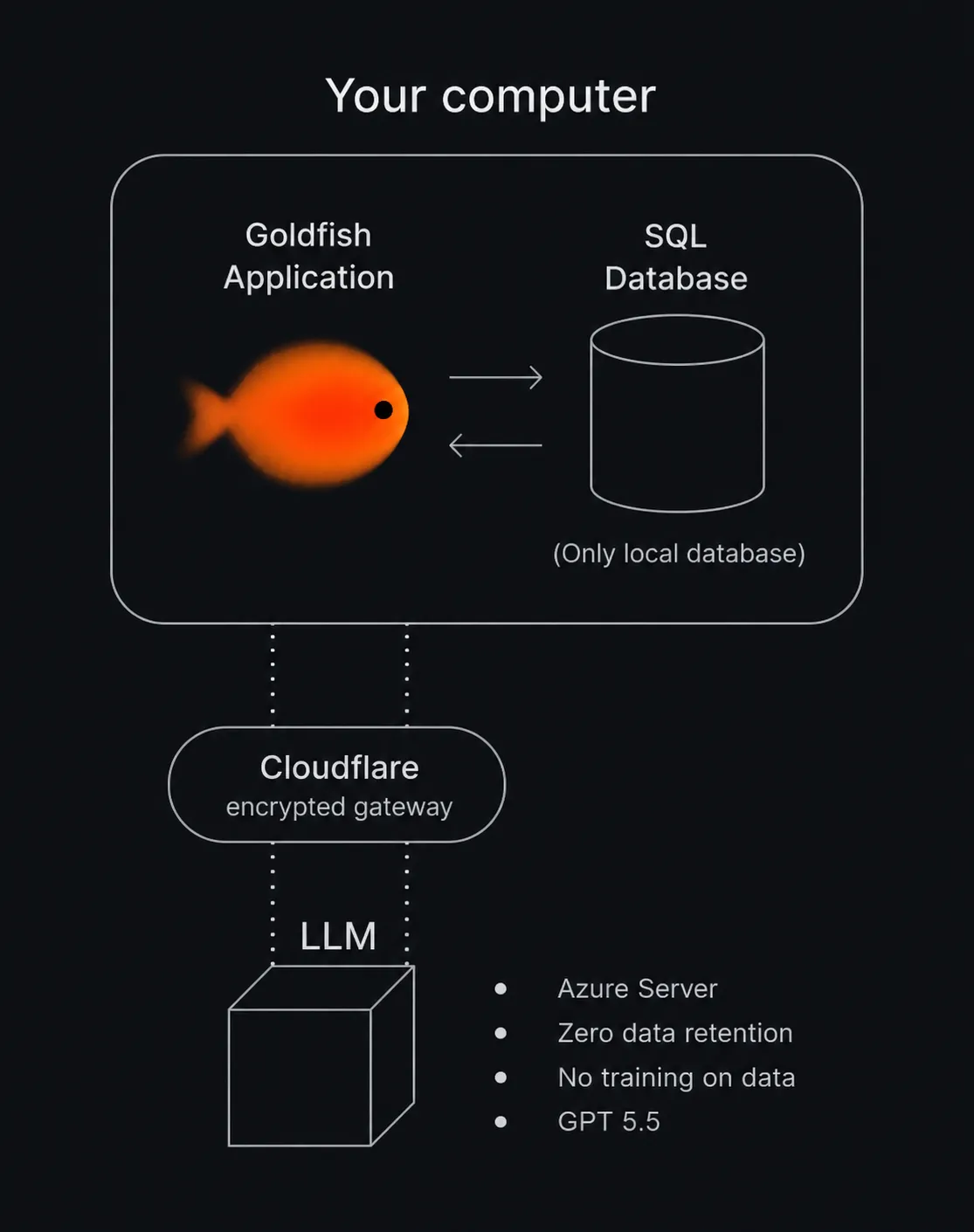
Your data stays on your device
All captured data is stored locally, on your computer. There is no backend and no cloud storage, and nobody (including Goldfish’s makers) can access it. LLM calls go through a private Azure OpenAI deployment with zero data retention.
Pause capture
Capture can be paused any time, from chat, Settings, or the tray icon, for a set duration or indefinitely.
The blacklist
The blacklist excludes apps or browser domains from capture entirely. Manage it in Settings under Privacy, or just ask in chat: “never capture my banking site”.
Masking at capture time
Card numbers, CVVs, social security numbers, and IBANs are masked at capture time by default, before anything is stored.
Local connections only
The local service that powers chat and the MCP server accepts connections only from your own machine, protected by a per-install token.
Deleting your data
Settings under Privacy has a delete-all-data option that wipes the local database. This cannot be undone, and nothing needs to be deleted anywhere else because nothing is stored anywhere else.